

What Dental Practice Management Software is as Defined by Oryx:
Dental practice management software is the core platform that runs the business and clinical operations of a dental practice. It centralizes patient information and supports day-to-day workflows across front office, clinical, and revenue cycle functions so teams can schedule, chart, diagnose, present treatment, communicate with patients, submit claims, and analyze performance from one place.
A credible PMS also acts as the integration hub for your broader tech stack—connecting imaging devices, AI radiograph analysis, e-prescriptions, clearinghouses, payments, and more. Data moves reliably without duplicate entry or fragile workarounds.
Short version: PMS is your practice’s home base. Everything else plugs into it.
What PMS Typically Includes
Front office
- Online and in-office scheduling, waitlists, and recall
- Patient intake, forms, e-signatures, eligibility checks
- Two-way messaging, reminders, and engagement tools
- Estimates, payment plans, and point-of-care payments
Clinical
- Comprehensive charting with perio, risk assessment, and preventive alerts
- Imaging acquisition and viewing; integration with sensors, intraoral cameras, pano/CBCT
- Treatment planning and case presentation with visuals
- E-prescriptions and clinical notes, voice capture options

Revenue cycle
- Fee schedules, claims, attachments, ERA, and posting
- Clearinghouse integrations and denial management
- Real-time analytics dashboards for production, collections, and case acceptance
Management & growth
- Multi-location support with a single database
- Role-based permissions and audit trails
- Customizable reports and KPI dashboards
Integrations: How PMS Connects Your Dental Tech
A modern PMS should “play well with others” out of the box. Key categories:
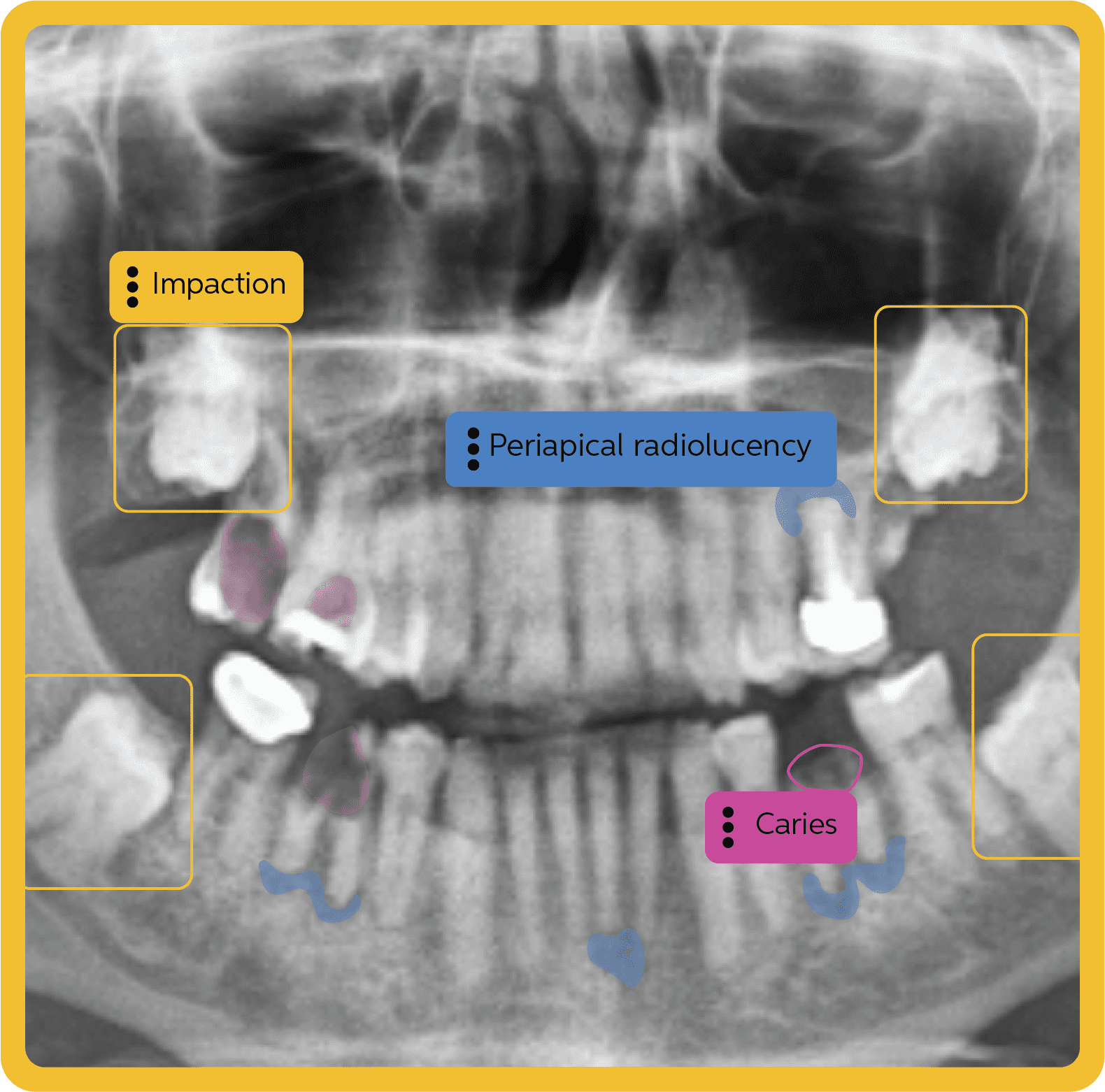
- AI & imaging (e.g., Overjet, Pearl): Pull AI findings and annotated images directly into the patient chart and treatment plan without breaking chairside flow.
- Clearinghouse & revenue (e.g., Vyne): Submit clean claims with required attachments and receive ERAs in one place to accelerate reimbursement.
- Devices & capture: Sensors, intraoral cameras, pano/CBCT units should be recognized without lock-in or forced hardware swaps.
- Patient communications: Reminders, online scheduling, and secure messaging should be built in or integrated tightly so teams avoid vendor sprawl.
- Productivity helpers: Voice dictation, eRx, and digital forms reduce clicks and manual entry.
Important note: Solutions like Overjet and Pearl (AI imaging) or Vyne (claims/attachments/clearinghouse) are not all-in-one PMS platforms. They depend on a reliable practice management system for patient data, images, and documentation flow.
Cloud Vs. On-premise: Choosing A Deployment Model
Both models exist—and credible definitions of PMS include either—but there are practical differences.
On-premise (server-based)
- You host and maintain local servers, backups, and updates.
- Tighter control on your hardware; often higher IT overhead.
- Remote access and multi-location scaling can be complex.
Cloud-based
- Secure hosting, backups, and updates managed by the vendor.
- Access from any supported device with an internet connection.
- Easier to standardize protocols and analytics across locations.
- Scales quickly as you add ops, providers, or sites.
If you’re growing, want unified analytics, or prefer lower on-site IT overhead, cloud systems usually create less friction and unlock faster innovation, provided you maintain reliable business-grade internet. If your practice must operate fully offline or you have strict local-only requirements, an on-premise model may still fit—just plan for the maintenance burden.
“Simple” Done Right: Why Integrated Beats “Basic”
Practices often learn the hard way that “basic” ≠ simple. Stripped-down systems make you bolt on communications, claims tools, analytics, or AI later—creating fragmented workflows, more logins, and rising costs. True simplicity means fewer clicks and fewer vendors because essential capabilities and integrations are already designed to work together.
Look for:
- Evidence-based, preventive alerts and risk scoring that guide consistent care
- Treatment planning that auto-pulls images, AI findings, and benefits details
- Built-in patient communications to prevent vendor sprawl
- Clear, guided RCM workflows that reduce denials and rework
Essential Selection Checklist
Use this list to evaluate any PMS (cloud or on-premise):
Clinical integrity
- Perio charting tied to risk analysis and preventive prompts
- Unified imaging and chairside presentation tools
- Structured notes with templates, eRx, and optional voice capture
Operational efficiency
- Online scheduling, waitlists, and smart recall
- Two-way texting and email with templates
- Mobile/tablet-friendly UI for consults and ops
Revenue performance
- Real-time eligibility, fee schedule management
- Native claims and attachment handling; clearinghouse integration
- Dashboards for production, collections, AR days, clean claim rate
Interoperability
- Direct integrations with AI imaging (Overjet, Pearl) and clearinghouses (e.g., Vyne)
- Device compatibility with major sensor/camera vendors
- Open standards or vendor-supported pathways for new connections
Scalability & security
- Role-based permissions, auditing, encryption at rest/in transit
- Single database for multi-location reporting
- Reliable backups and business continuity plan
Total cost & packaging
- Transparent pricing with bundled core features
- Minimal reliance on paid add-ons for must-have functions
- Training, onboarding, and data conversion support included
Migration and Onboarding: What Good Looks Like
Switching systems should feel like an upgrade, not a second job. Expect:
- Data & image conversion: A vendor-led process with a test environment for validation before go-live.
- Guided onboarding: Step-by-step configuration aligned to your workflows.
- Live training & go-live support: So the team is confident on day one.
- Change management plan: Clear roles, timelines, and KPI targets for the first 90 days.
Frequently Asked Questions
Is AI imaging (Overjet, Pearl) a practice management system?
No. These are AI-powered tools that analyze radiographs and images. They integrate with your PMS to enrich diagnosis and case presentation, but they do not replace PMS functions like scheduling, charting, billing, or claims.
Is a clearinghouse like Vyne a PMS?
No. Clearinghouses transmit claims, attachments, and ERAs. Your PMS integrates with them to streamline the revenue cycle.
Will I have to replace my cameras or sensors when I change PMS?
With a connection-friendly PMS, major devices should remain compatible. Confirm your specific models during the demo and migration planning.
Do I need fast internet for cloud PMS?
Yes. Cloud systems rely on stable, business-grade connectivity. If you choose cloud, confirm minimum bandwidth and redundancy options with your vendor.
Can I start small and add features later?
Ideally your PMS ships with core clinical, communication, and RCM capabilities bundled, so you are not forced into piecemeal add-ons as you grow. Advanced packages can layer in when you are ready.
The Takeaway
Dental practice management software is not a single feature—it is the connected foundation for how you deliver care, communicate with patients, and get paid. Whether you choose cloud or on-premise, prioritize a platform that integrates your tools, reduces manual work, and standardizes high-quality, preventive-first care.
If you want the advantages of rapid updates, multi-location scalability, and unified analytics with lower on-site IT overhead, cloud-based PMS is often the most future-ready path—especially when it is designed by dentists, for dentistry and built to play nicely with AI imaging, devices, and clearinghouses from day one.
Continue Your Research
- Dental Software Integrations: Building a Connected Practice — how a PMS should act as your connection-friendly command center.
- The Myth of Simplicity in Dental Software — why “basic” creates more work and integrated design makes complexity feel effortless.
- Time to Move On: How Legacy Dental Software Holds Practices Back — practical reasons to leave server-based limitations behind.
- Oryx’s Guide to Business Excellence in Dentistry — KPIs and workflows that tie clinical quality to business performance.
Ready to See an Integrated, Cloud-based PMS in Action?
Schedule a personalized demo and test how your imaging, AI, and clearinghouse tools plug into one platform—without adding friction.